Data module
This module contains functionality to dynamically load data when executing a pipeline or workflow. It can be imported as follows:
>>> from dtaianomaly import data
Custom data loaders can be implemented by extending LazyDataLoader.
- class dtaianomaly.data.LazyDataLoader(path: str | Path, do_caching: bool = False)[source]
A lazy dataloader for anomaly detection workflows
This is a data loading utility to point towards a specific data set (with path) and to load it at a later point in time during execution of a workflow.
This way we limit memory usage and allow for virtually unlimited scaling of the number of data sets in a workflow.
- Parameters:
path (str) – Path to the relevant data set.
do_caching (bool, default=False) – Whether to cache the loaded data or not
- cache_
Cached version of the loaded data set. Only available if
do_caching==Trueand the data has been loaded before.- Type:
- Raises:
FileNotFoundError – If the given path does not point to an existing file or directory.
- class dtaianomaly.data.DataSet(x: ndarray, y: ndarray)[source]
A class for time series anomaly detection data sets. These consist of the raw data itself and the ground truth labels.
- Parameters:
x (array-like of shape (n_samples, n_features)) – The time series.
y (array-like of shape (n_samples)) – The ground truth anomaly labels.
Synthetic data
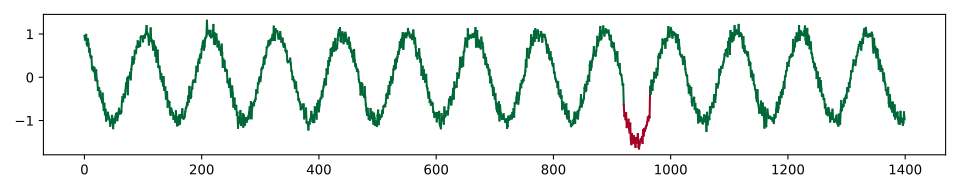
- dtaianomaly.data.demonstration_time_series() -> (<class 'numpy.ndarray'>, <class 'numpy.ndarray'>)[source]
Generate a time series for demonstration purposes. This is a noisy sine wave with one valley that is deeper than the other ones.
- Returns:
x (np.ndarray of shape (nb_samples)) – The raw time series data
y (np.ndarray of shape (nb_samples)) – The ground truth labels
- dtaianomaly.data.make_sine_wave(nb_samples: int, amplitude: float = 1.0, frequency: float = 5.0, phase: float = 0.0, noise_level: float = 0.2, seed: int = None, **kwargs) -> (<class 'numpy.ndarray'>, <class 'numpy.ndarray'>)[source]
Generate a random sine wave and inject anomalies into it.
- Parameters:
nb_samples (int) – The length of the sine wave.
amplitude (float, default=1.0) – The amplitude of the sine wave, the max absolute value of the sine wave.
frequency (float, default=5.0) – The frequency of the sine wave, the number of oscillations
phase (float, default=0.0) – The phase of the sine wave, where the oscillation starts.
noise_level (float, default=0.2) – The amount of Gaussian noise to add to the time series
seed (int, default=None) – The seed for generating a random sine wave. If no value is provided, then the sine wave will be random.
**kwargs – Parameters to pass to the
inject_anomaliesmethod.
- Returns:
x (np.ndarray of shape (nb_samples)) – The raw time series data
y (np.ndarray of shape (nb_samples)) – The ground truth labels
Loading data
- class dtaianomaly.data.UCRLoader(path: str | Path, do_caching: bool = False)[source]
Lazy dataloader for the UCR suite of anomaly detection data sets.
This implementation expects the file names to contain the start and stop time stamps of the single anomaly in the time series as: ‘*_start_stop.txt’.
- dtaianomaly.data.from_directory(directory: str | Path, dataloader: Type[LazyDataLoader]) List[LazyDataLoader][source]
Construct a LazyDataLoader instance for every file in the given directory
- Parameters:
directory (str or Path) – Path to the directory in question
dataloader (LazyDataLoader object) – Class object of the data loader, called for constructing each data loader instance
- Returns:
data_loaders – A list of the initialized data loaders, one for each data set in the given directory.
- Return type:
List[LazyDataLoader]
- Raises:
FileNotFoundError – If directory cannot be found