Anomaly detection
The core functionality of dtaianomaly is to offer a simple interface
for time series anomaly detection. Below, we illustrate how anomalies can
be detected in time series using dtaianomaly.
Note
Some of the code has not been added to this webpage for clarity reasons. The full code can be found in the anomaly detection notebook.
Load the data
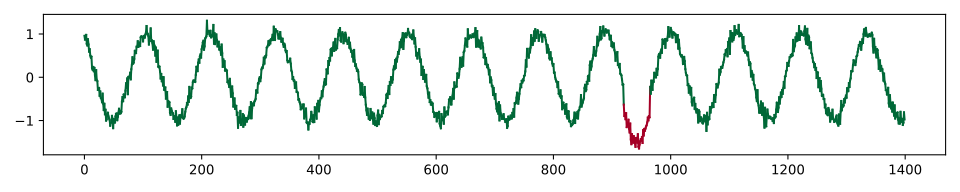
We will illustrate how to detect anomalies with dtaianomaly using the
demonstration time series. This time series can easily be loaded using the
demonstration_time_series() method and then plotted
using the plot_time_series_colored_by_score()
method.
from dtaianomaly.data import demonstration_time_series
from dtaianomaly.visualization import plot_time_series_colored_by_score
X, y = demonstration_time_series()
plot_time_series_colored_by_score(X, y, figsize=(10, 2))
Anomaly detection
Before detecting anomalies, we can preprocess the time series. In this case,
we apply MovingAverage to remove some
of the noise from the time series.
from dtaianomaly.preprocessing import MovingAverage
preprocessor = MovingAverage(window_size=10)
In general, any anomaly detector
in dtaianomaly can be used to detect anomalies in this time series. Here, we use the
MatrixProfileDetector
from dtaianomaly.anomaly_detection import MatrixProfileDetector
detector = MatrixProfileDetector(window_size=100)
Now that the components have been initialized, we can preprocess the time series and
detect anomalies. Note that the preprocessor returns two values, processed data X_
and processed ground truth y_. While MovingAverage
does not process the ground truth, other preprocessors may change the ground truth slightly.
For example, SamplingRateUnderSampler samples both
the time series X and labels y.
X_, y_ = preprocessor.fit_transform(X)
y_pred = detector.fit(X_).predict_proba(X_)
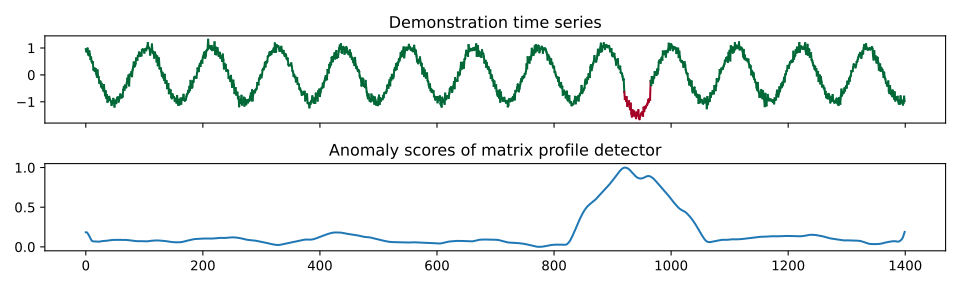
Now we can plot the data along with the anomaly scores, and see that the predictions nicely align with the anomaly!
Anomaly detection with a Pipeline
Above, we manually preprocessed the data and detected anomalies within the processed
data. In dtaianomaly, these steps can be performed automatically using a
Pipeline. Upon initialization, we simply pass the
preprocessors we want to apply, as well as the detector. The fit and predict methods
will automatically process the data before detecting anomalies. Note that it is also
possible to pass a list of preprocessors to apply multiple preprocessing steps before
detecting anomalies.
from dtaianomaly.pipeline import Pipeline
pipeline = Pipeline(
    preprocessor=preprocessor,
    detector=detector
)
y_pred = pipeline.fit(X).predict_proba(X)
Quantitative evaluation
Besides visually checking the performance of an anomaly detector, it is also important
to quantitatively measure how accurately the anomalies are detected. Below, we first
compute the Precision and Recall.
However, that the precision and recall require binary labels, while the predicted anomaly
scores are continuous. For this reason, we apply FixedCutoff
thresholding to convert all scores above 0.85 to 1 (“anomaly”) and the scores below 0.85
to 0 (“normal”). At this threshold, we see that all anomalous observations are detected
(recall=1.0), at the cost of some false positives near the borders of the ground truth
anomaly (precision<1).
from dtaianomaly.thresholding import FixedCutoff
from dtaianomaly.evaluation import Precision, Recall
thresholding = FixedCutoff(0.85)
y_pred_binary = thresholding.threshold(y_pred)
precision = Precision().compute(y, y_pred_binary)
recall = Recall().compute(y, y_pred_binary)
Alternatively to manually applying a threshold to convert the continuous scores to
binary predictions, you can initialize a ThresholdMetric,
which will automatically apply a specified thresholding strategy before using a binary
evaluation metric. Below, we use the same thresholding as above, but compute the
FBeta score with \(\\beta = 1\).
from dtaianomaly.evaluation import ThresholdMetric, FBeta
f_1 = ThresholdMetric(thresholding, FBeta(1.0)).compute(y, y_pred)
Lastly, we also compute the AreaUnderROC and
AreaUnderPR. Because these metrics create a
curve for all possible thresholds, we can simply pass the predicted, continuous
anomaly scores, as shown below.
from dtaianomaly.evaluation import AreaUnderROC, AreaUnderPR
auc_roc = AreaUnderROC().compute(y, y_pred)
auc_pr = AreaUnderPR().compute(y, y_pred)
The table below shows the computed performance metrics for this example.
Precision |
Recall |
F1 |
AUC-ROC |
AUC-PR |
|---|---|---|---|---|
0.64 |
1.0 |
0.78 |
0.99 |
0.68 |